

Uses / Code in your own building
Code in your own building
Agentic coding usually means shipping your codebase to someone's cloud. Your Own AI does the work where the code already lives: your machine.
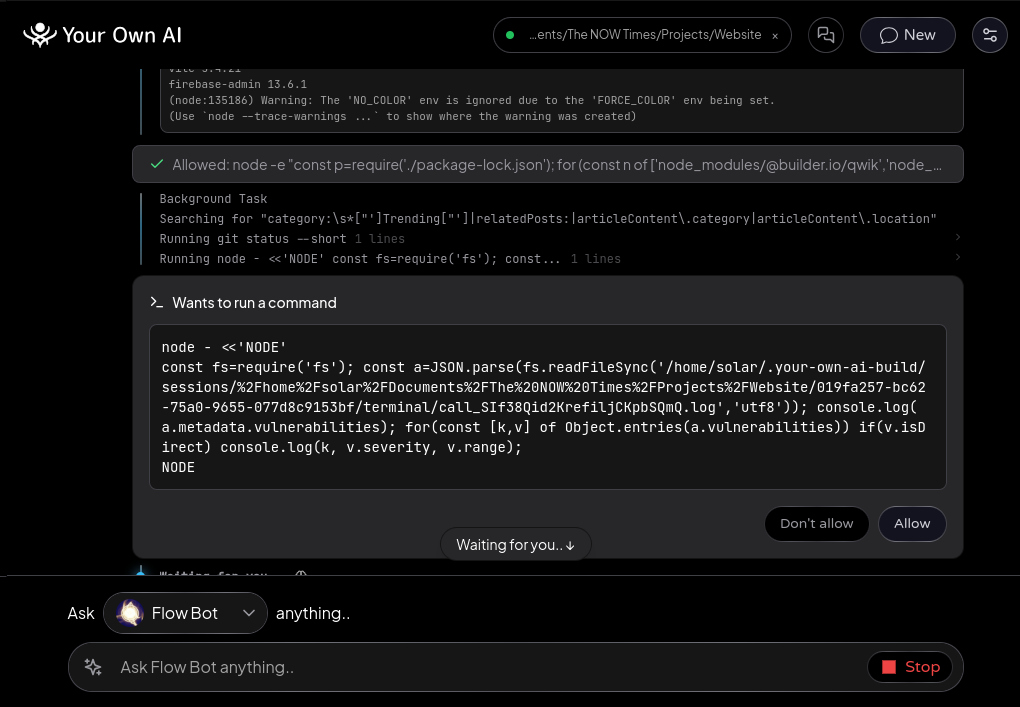
Open the project's folder and the conversation becomes the workbench - the AI reads files, proposes edits as colored diffs, runs builds and tests with output streaming live, and asks before every action with the exact command shown in full.
Everything it does lands in the same signed conversation record as everything it says, so "what exactly did the AI do?" always has an answer.
The agent itself is open source. Your Own AI Build is our fork of xAI's Grok Build with the parts that phoned home taken out - no telemetry, no uploads, no auto-update; nothing leaves your machine unless you route it there. And it drives any of your AIs: run a whole project on the models you've downloaded (offline only, no exceptions), or let routing bring a frontier model to the hard steps and keep the rest local - your choice per AI, and the receipt says which model did what.
How it works
- 1
One-click setup
The first time you open a project, the app offers Your Own AI Build - one click downloads and installs the free ~50 MB add-on in the background while you keep chatting; nothing to configure. Updates arrive the same way, from Components in Settings. It is open source (Apache-2.0).
Your Own AI Build on GitHub → - 2
Pick an AI that can drive
Project work needs a model built for tools and long tasks. Offline, that means a downloaded model marked Agentic on the Offline Models page - the app shows which of yours qualify, and warns before you start if none does. Online, the frontier models all can. Set it per AI with the model chip: Offline Only keeps every step on your machine; a named online model sends the work there; Auto - Online and Offline lets routing choose per step, keeping the light steps local and reaching out for the hard ones. Settings > Routing tunes how eager that is.
- 3
Open the project's folder
The folder button in the header, "Open a project..." in the sparkle menu, or drop a folder onto the message field. That conversation becomes the workbench for that folder.
- 4
Watch the work happen
Every step shows with its real output: edits as colored diffs, builds and tests streaming live, background scripts kept in view even while you keep typing. When a turn finishes it folds to one line - reopen it anytime. Long sessions condense their working notes and say so.
- 5
Permissions, not surprises
Every command and edit asks first, with the exact command shown in full - never truncated. "Don't ask again" applies only to what it names, only in this project.
- 6
The project remembers
Tell the AI to remember a decision or a convention and it saves to a project memory all your AIs share. Reopening a conversation picks up where it left off - same folder, same context.
- 7
Prove what happened
Export the conversation - steps, diffs, and commands included - as a file, optionally signed so anyone can verify it at flowsta.com.
Free · Open source · macOS, Windows, Linux