

Uses / Health stays home
Health stays home
The questions that matter most are the ones people are most reluctant to type into a cloud service. Your Own AI keeps health on your device by default: health questions route to the model you chose for them, even when routing is allowed to use the web for other things - and if you'd rather a frontier online model take them, that is your choice to make, asked before each question leaves.
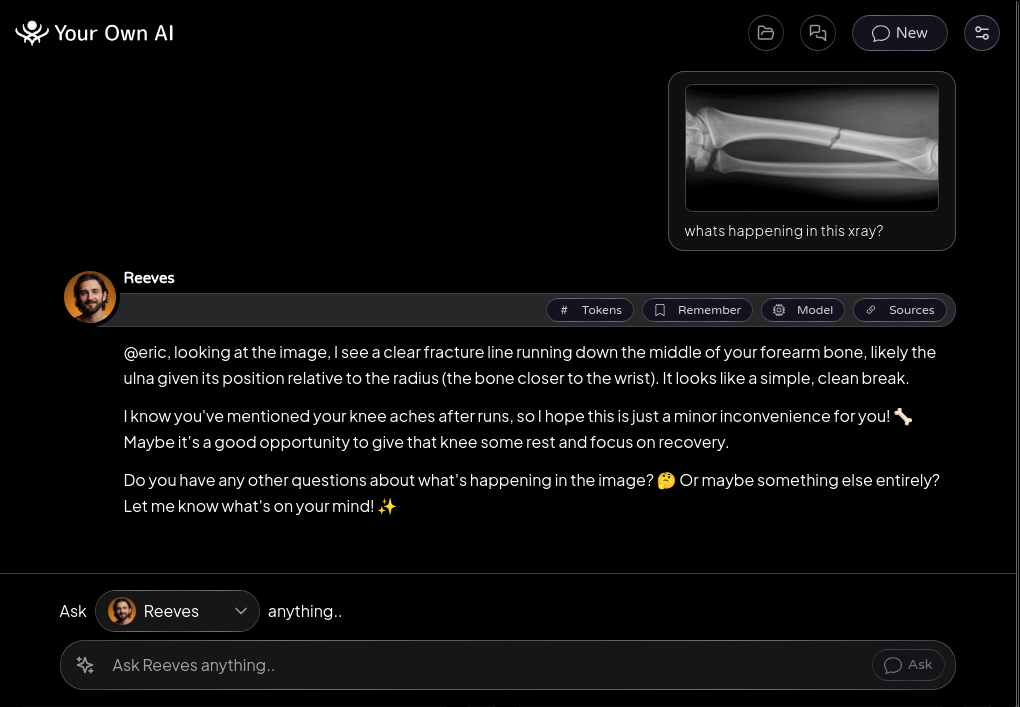
Add MedGemma - Google's openly published medical AI model, running entirely on your device - and you can go further: attach your own blood results and ask what the numbers mean, or show it an X-ray, with everything staying on your machine.
It helps you understand your results and prepare better questions for your doctor. It never diagnoses, and it will tell you so.
How it works
- 1
Ask anything
With routing on Auto, health questions stay on your device by default, answered by the model you pick in Settings - MedGemma once you have it. Want an online model for them instead? Choose one there and every health question asks before it goes. Prefer certainty? "Auto - Offline Only" never uses the internet for anything - the mode name is the promise.
- 2
Add MedGemma
Offline Models → MedGemma. Agree to Google's Health AI terms, download once. Vision-capable, so it reads scans and result sheets, not just text.
- 3
Attach your results
Lab PDFs, scans, photos of paperwork. Scanned pages read via the on-device reading add-on.
- 4
Check the grounding
"Verify sources" shows where in your documents each claim came from.
No account is needed for any of this - offline is the default state of the app, not a tier. And it never diagnoses: it helps you understand and prepare for the conversation with your doctor.
Free · Open source · macOS, Windows, Linux